Callouts and labels
Tip alert video template
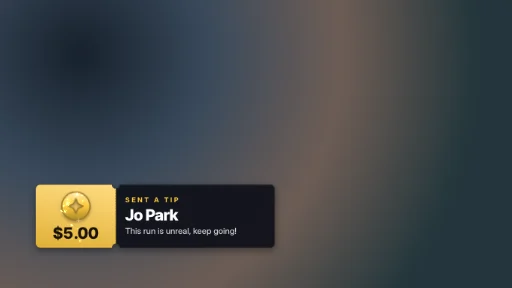
A ticket slides in at the foot of the screen: a coin flips on its stub over the amount, and who tipped and what they said.
ProPart of Pro. Try Pro free for 14 days, with no card.
- Shape
- 16:9, over your footage, laid out again for 9:16, 1:1, and 4:5
- Length
- 7 s as it comes; from 3 to 15 s
- Made of
- 4 text layers, 4 shapes, and 1 particle system: 9 layers in all
Make it yours
What you can change
Every setting below is in the editor’s Inspector once it’s in your project, and every layer it’s made of can be opened up and changed as well.
Words
- AmountUp to 12 characters
- What they didUp to 30 characters
- NameUp to 30 characters
- MessageUp to 80 characters
Colors
- Coin#FFC83D
- Ticket#11131C
- Text#FFFFFF
- Stub text#1A1206
Type
- ModernInter Tight with Interas it comes
- EditorialFraunces with Inter
- CondensedAnton with Inter Tight
- GeometricUnbounded with Manrope
- ClassicCinzel with Cormorant Garamond
Options
- SideLeft or Right
- AnimationHow much its parts move as they come in, from none, where they only fade, to all of it.
Its 5 palettes
- Gold
- Mint
- Rose
- Ice
- Paper
How to use it
From template to finished video
Start a project from it
Use this template opens a new project with it laid out in it. It’s a Pro template: on the free plan, try Pro first.
Make it say what you want
Type over its words: Amount, What they did, Name, and Message.
Give it your look
Pick one of its palettes or set its colors to your brand’s, and set its words in any of 5 pairs of typefaces.
Fit it to the frame
Made in 16:9, it’s laid out again for 9:16, 1:1, and 4:5. Make it as short as 3 seconds or as long as 15.
Export
Export it on its own or as part of your edit, in your browser, with no watermark.
What it’s for
Callouts and labels
Point at what matters in your footage: an arrow, a label, a subscribe button, a note that pops in.
It’s drawn over your footage, with no background of its own: it goes on a track above the clip it’s for.
Every template of this kindMore like it
Templates like this one
The next scene is yours.
Make it yours.
Part of Pro. Try Pro free for 14 days, with no card.